
Kobelco Model 10 Excavator Breaker Hydraulic Flow Adjustment Tutorial: Display Screen Parameter Settings and Operating Guide
Introduction: When operating a 10-type excavator with a hydraulic breaker (hammer), adjusting the hydraulic oil flow is essential to control the striking frequency (making it faster or slower). In this guide, we will walk you through the step-by-step process of adjusting the breaker flow directly through the monitor screen.
Step 1: Enter the Service Menu
To access the advanced adjustment menus on your monitor:
Press and hold the buzzer button on the control panel.
Turn on the key switch while holding the button.
Press the confirm button 3 times consecutively to enter the service interface.

Step 2: Locate Breaker Settings
Once inside the service adjustment menu:
Select SERVICE ADJUST 1 and navigate down to page 1, sub-page 2.
Locate the BREAKER SETTING option and select it.
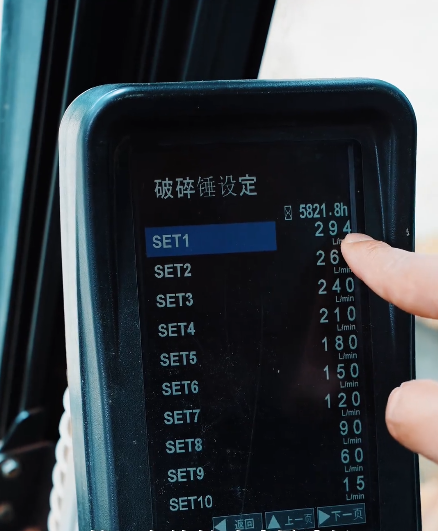
You will see a list of presets (SET1 to SET10) displaying the current flow rates (e.g., SET1 at 294 L/min).
Step 3: Adjust Flow Rate & Confirm
To modify the flow rate:
Use the arrow keys to adjust the value up or down (e.g., reducing it from 294 L/min to 234 L/min).
Press the confirm button to save the changes.
Return to the main screen to verify that the active breaker flow reflects your new setting.